Nitro RC Helicopter Cooling
Checking The Fan Is Important
by John Salt
All model nitro engines like the ones used in nitro RC helicopters are air cooled. They will have cooling fins around the cylinder body to dissipate heat, and the even more cooling fin surface area around the head. Especially on RC helicopter specific nitro engines as shown below.
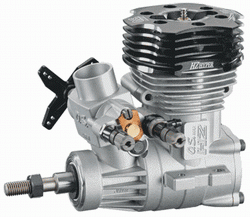
Nitro boat engines are the exception; most of them have water cooled heads.
With planes and cars, there is almost always sufficient air flow around the engine to provide adequate cooling, but that's not the case with our RC helicopters.
Our helicopter nitro or gas engine is always nicely secured, safe and sound in the middle of the framed sections of the helicopter mechanics.
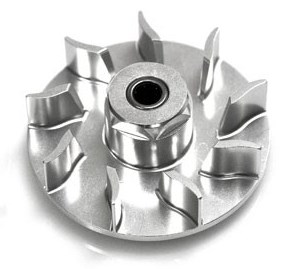 Nitro RC Helicopter Centrifugal Cooling Fan
There is very little air flow around this engine location and if you have a scale model that totally encloses the mechanics, there is next to no air movement.
So how do our engines stay cool?
Over and above the larger cooling fin surface area on the head of the engine, all nitro (and gas) powered RC helicopters use small centrifugal cooling fans. These fans are mounted directly to the output shaft of the engine.
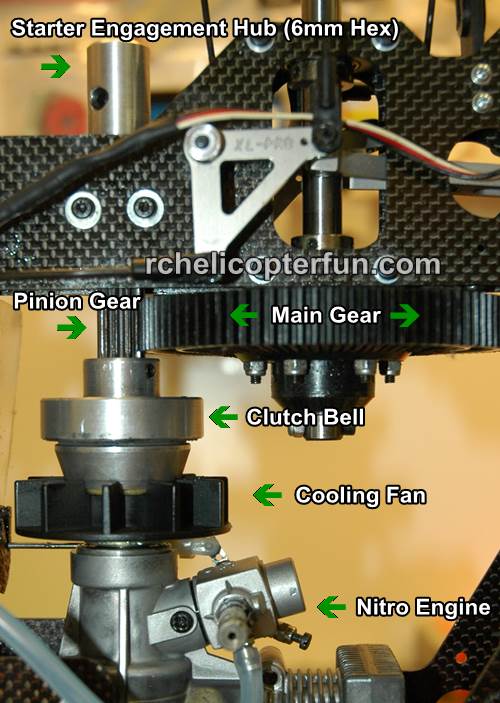
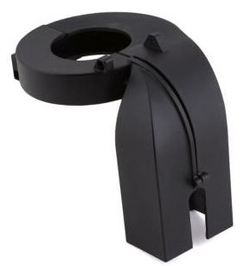 RC Heli Cooling Fan Shroud
The photo above shows where the cooling fan is located in relation to the other nitro engine components in a typical nitro powered RC helicopter.
Please note, the cooling shroud that goes around the fan to direct air flow over the engine cooling fins has been removed to see various parts better.
The one issue to be aware of with nitro RC helicopter cooling fans is they are vibration prone!
Gas and nitro RC helicopter cooling fans are mounted directly to the engine output shaft and are therefore spinning at very high RPM’s – upwards of 18,000 in some cases. If the fan is even a little bit out of balance or not sitting square to the engine output shaft, this will cause harmful high frequency vibrations in your nitro and gas RC helicopter.
I have personally experienced stress cracking on an aluminum framed RC helicopter from high frequency cooling fan vibration. The stress cracks started growing outward from the engine mounting locations on the frames. I was able to slow the cracks from growing longer by drilling small holes (crack arrest holes) on the end of each crack in the frames, but that was only a short term band-aid with the underlying cause not corrected. I eventually had to replace the frames and find the source of the vibration - it was the cooling fan all along!
These high frequency cooling fan vibrations if not corrected will also shorten the life of your servos and radio equipment while wearing out the crank bearings in the engine and clutch assembly quickly. Hi frequency vibration can also cause the centrifugal clutch ears to develop cracks where they flex. Yep, costly first hand experience was my teacher before I understood just how destructive high frequency vibrations can be to an RC helicopter.
A good indication if you have these vibrations is to watch the fuel in your gas or nitro fuel tank. If it foams up excessively you most likely have high frequency vibrations from the fan or starter shaft if your nitro RC helicopter uses that kind of starting system.
An even better option these days is more and more FBL systems now also have vibration analysis data logging (using the 3 axis accelerometers inside the units as vibration measurement sensors). These units can really help identify unwanted / destructive vibration - very useful tools!
I've also seen the horizontal stabilizer (if your heli has one) vibrate so fast it actually looks blurry/fuzzy. This is another good indication of cooling fan or other high frequency engine vibration issue/s as well. A fuzzy tail fin on the other hand is generally caused by a tail rotor high frequency vibration (bent tail rotor shaft, bent tail rotor hub, out of balance tail rotor blades, etc.).
What To Do?
To ensure you have a vibration free nitro RC helicopter cooling fan, you should always check the balance and run-out of the fan assembly.
Nitro RC Helicopter Cooling Fan Balance
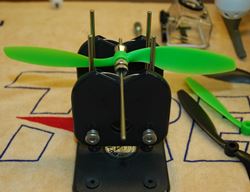
To check the balance you will need a good high point balancer such as the amazingly useful Du-Bro Tru-Spin balancer shown here checking the balance of a propeller, but the same exact method is used to check and balance a nitro heli cooling fan.
This RC helicopter tool is indispensable and you will use it many times when building, checking, or repairing various rotating items on your RC helicopter (main rotor, tail rotor, fan).
With your fan assembly in the balancer, watch and see if it rotates to a heavy spot. Mark the spot on the fan and turn it around on the balancer and perform the test again. If the fan rotates and settles with the heavy spot that you marked on the bottom again, you know for sure that is the heavy spot and the fan is definitely out of balance.
You must now file or grind a little material off the fan at the heavy spot. Recheck the balance again. Continue doing this until the fan is perfectly balanced. Cooling fans today are generally very well balanced right out of the box, but they should still be checked.
Nitro RC Helicopter Cooling Fan Run-Out
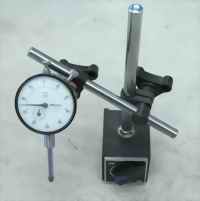
What is run-out you ask? A fan that is not sitting perfectly square and true on the engine output shaft will have run-out or “wobble”.
To check for this you mount your fan on the engine shaft as per your manufacturers instructions and then hold your engine gently but firmly in a bench vice or portable table vice.
Caution here, just enough force to keep the engine from moving – the last thing you want to do is bend or crush the engine block. I usually grab one side of engine mounting plate in the vice so no pressure is on the case itself.
Now using a dial indicator with a magnetic base (another indispensable tool you will need if you are into nitro powered RC helicopters), you will measure any wobble in the fan. A dial indicator with a resolution of 0.001" (one thousandth of an inch) is good enough.
Place the dial indicator rod on the back face of the cooling fan as far out from the engine shaft as possible and rotate the fan. I find it best to remove the glow plug in your engine. It will be much easier to turn with no compression build up which can cause erroneous readings.
Now watch the dial movement on your dial indicator. It's best to turn the fan and completely let go to get an accurate reading – do this at 90 degree intervals around the fan, the dial indicator should show less than 0.002" of an inch of run out, less than 0.001” is even better.
If your run-out or wobble is more than that, remove the fan from the engine shaft, reposition the centering collet on the engine shaft, refit the fan, and recheck the run out. You may have to do this several times, but you should be able to get it under 0.002”.
If you can’t, the fan may be bent, the collet may have been machined improperly, the engine shaft is bent or the engine crank bearings have excess play/wear. With your dial indicator, you can check each item individually if required.
Keeping Your Cooling Fan, Shroud and Engine Fins Clean
Another important gas and nitro RC Helicopter cooling tip is fairly obvious, but also hidden - keeping all these cooling components clean.
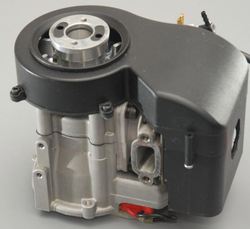 Fan & Fins Hidden From View
On most gas and nitro RC helicopters, the inside of the shroud, fan and cooling fins on the engine are completely hidden from view for inspection.
Coupled with the fact, there is lots of oil residue coating all these parts causing them to attract dirt; cooling will be reduced significantly.
I remember one of my X-Cell Fury 50's back in the day started going through glow plugs every dozen flights or so, and it was always leaning out after flying for a few minutes (classic signs of running too hot). Sure enough, when I removed the cooling fan shroud to have a look-see, the fan, insides of the shroud and facing cooling fins on the engine were all gummed up with poplar tree fluff/cotton.
In conclusion, all these nitro RC helicopter cooling fan inspection and checking procedures are not just for newly built nitro and gas RC helicopters – you should also check the run-out of the fan after a bad crash to make sure the fan, the engine crank shaft or crank bearings haven’t been damaged.
Fan balance shouldn’t change unless a piece of the cooling fan broke off – in that case you will need a new fan anyway and have to recheck the balance.
And if you fly in an area where there is tree or weed fuzz floating about, keep a watchful eye on the cleanliness of these components!
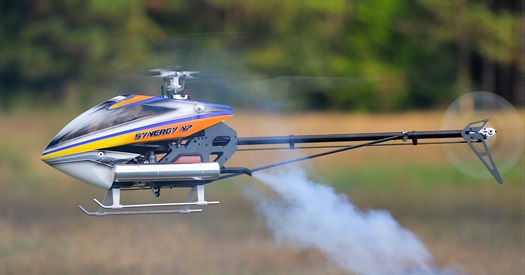 Clean & Vibration Free Cooling Fan = Cool & Smooth Flying Nitro RC Helicopter
 Having Fun With "The Wolf"
About the Author:
Hi, I'm John Salt (RC helicopter enthusiast and flying instructor). I've been building, flying, and helping people successfully take up the hobby of RC helicopters for over 35 years.
My goal is to take the mystery out of this amazing hobby so you can save time, spend less, while having more fun and success. Want to see my full story? Head over to my About Me Page.

Need Heli Help?
- Getting into the hobby but have no one to help you?
- Are you feeling overwhelmed & confused?
- Are you tired of wasting time seeking partial and conflicting information?
- Don't understand the maze of RC heli setup fundamentals?
- Is that sickening feeling after crashing turning you off the hobby?
- Are you simply ready to give up?
My RC Helicopter eBooks will help you with those exact problems. Grab your copies today.

Click Here For More Information

Click Here For More Information

Click Here For More Information
Recent Articles


-
Best LiPo Battery Brands - Price, Performance, Lifespan.
Sep 24, 26 02:10 PM
 You're looking for the best LiPo RC battery brand for the dollar while avoiding the hype and BS! Here are recommendations based on actual long term usage.
 -
What Makes OMPHobby RC Helicopters So Good & Should You Get One?
Aug 24, 26 03:01 PM
 OMPHobby RC Helicopters are designed to last! Easy to see, robust, impressive engineering, great parts support and much more.
 -
RC LiPo Battery Storage - Keep Your LiPo's Safe & Healthy
Jul 23, 26 07:51 PM
 Why is RC LiPo battery storage so important? Easy, it extends battery life saving you money plus increasing storage safety.